


CreditWise from Capital One
4.640.63K Reviews
App Specs
- Version
- 1.151.0
- Updated On
- License
- Free
- Downloads
- 5,000,000+
- Developer
- Capital One Services, LLC
- Categories
- Finance
- Platform
- Android, iOS
Screenshots
 Analysis by AppCompare
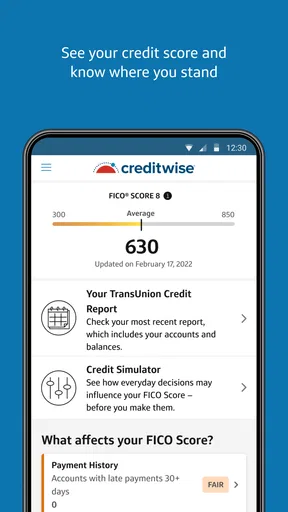
I approached CreditWise from Capital One as a practical finance app rather than a complete banking replacement. Its focus is narrower and, in my view, more useful for that reason: it puts a free credit score and credit monitoring in one place so I can check my credit picture without treating every glance as a major financial event. The app is free, aimed at everyone, and developed by Capital One Services, LLC.
That narrow purpose matters. Many people only think about their credit when applying for a card, renting a home, financing a car, or receiving an unexpected notice. CreditWise is better suited to building a regular checking habit. I can open it, review what has changed, and decide whether I need to investigate further. It does not turn credit management into a game, and I would not use it as my only source of information when making a large financial decision, but it gives everyday users a more approachable starting point.
What the app is really useful for
In my experience, the strongest part of CreditWise from Capital One is the reduction of friction. The app presents credit-related information in a format that is easier to revisit than paper correspondence or a desktop account portal. That makes it particularly useful for someone who wants awareness without becoming an expert in credit reporting.
A realistic example is preparing to move. Before submitting a rental application, I could use the app to review my current credit position and look for anything unfamiliar. If something appeared that I did not recognize, I would treat that as a prompt to investigate through the appropriate reporting or creditor channels, not as proof that the app itself had resolved the issue. This distinction is important: monitoring helps me notice a concern, while correcting a credit-file problem usually requires action beyond a monitoring screen.
The same workflow works before applying for a new credit product. I can check my situation first, avoid applying impulsively, and think about whether the timing makes sense. That is a better use of a monitoring tool than opening it repeatedly with no question in mind. I found the app most valuable when I connected each visit to a decision: checking before an application, reviewing after a financial change, or confirming that an unfamiliar event deserves attention.
CreditWise also makes sense for people who are rebuilding their financial routines. A user who has ignored credit for years may find a dedicated monitoring app less intimidating than a full personal-finance suite filled with budgets, investments, loan tools, and account aggregation. The trade-off is that the narrower experience will not replace those other tools. If I want a complete view of spending, savings, cash flow, and debt payments, I need a separate solution.
Trust starts with knowing what the app can and cannot do
Credit information feels sensitive, so I judge this app less by visual polish and more by the choices it gives me around access and account use. The developer is clearly identified as Capital One Services, LLC, and the app has been available since April 2016. Its current version is 1.150.0, and it has reached over five million installs, with an average rating of 4.6 from around 116 thousand ratings. Those figures suggest that it is an established product, but popularity alone is not a substitute for reading the app’s current privacy information or deciding whether its purpose matches my comfort level.
Worth Reading Before You Choose

EA SPORTS FC Mobile 26 Is a Bigger Football Game, but It Takes Time

Flipboard Shows What News Apps Must Do Beyond the Feed

Switching to Android Auto Means Rethinking Your Driving Routine

Google Calendar Makes a Crowded Week Easier to Manage

Ludo King Makes the Most of the Minutes Between Plans

Baby Panda World Brings Quick Play to Modern Phones, but Its Game Library Feels Busy
I would begin by examining the sign-in process and any account prompts carefully. A finance app deserves the same caution as online banking: I would use a unique password where applicable, avoid entering credentials on an unfamiliar device, and review the device’s security before signing in. I would also avoid assuming that because the app is free, it has no data-related considerations. Free access removes the subscription barrier, not the need to understand how an account works or what information is involved.
The most trustworthy habit is to keep the app’s role in perspective. A credit score is an indicator, not a universal approval decision. Lenders, landlords, and other organizations can use different information and criteria. I would therefore use the app to prepare questions and notice changes, not to promise myself a particular outcome. That is one of the most important practical limits for a new user to understand.
Controls I would check before making CreditWise part of my routine
When I review a finance app, I look for visible ways to control the account rather than relying on assumptions. In CreditWise, I would pay attention to sign-out behavior, notification settings, contact preferences, and any security or privacy area available inside the account. I would make those choices during setup instead of accepting every prompt quickly, especially if I am using the app on a shared or borrowed phone.
Notifications deserve special attention. A credit-related alert can be helpful, but it can also expose sensitive context on a lock screen. I would choose whether previews appear and whether alerts should be enabled at all. For a personal device, immediate notifications may help me notice a change quickly. For a phone that other people can see, a less revealing setting is the more sensible choice. This is a small control, but it directly affects privacy in everyday life.
I would also review permissions when the app requests them and revisit them later through the operating system. I do not grant access simply because an app is in the finance category. If a permission is not clearly connected to the action I want to perform, I would leave it disabled until I understand why it is needed. That approach avoids turning convenience into an automatic surrender of device access.
Account control also means knowing how to stop using the service. If I no longer want the app, I would look for in-app account-management instructions and the developer’s official support or privacy guidance before merely deleting the icon. Removing an app from a phone is not always the same as closing an online account or changing communication preferences. I would complete those steps deliberately, then uninstall it if I no longer needed local access.
Handling sensitive moments without overreacting
The most sensitive moment is seeing something I do not recognize. My first reaction would be to record the relevant details, check whether the event could be connected to a recent application or account change, and then contact the appropriate creditor or reporting service through an official channel. I would not tap through unfamiliar messages or call a number copied from a suspicious notification. The app can help me notice a question; it should not encourage me to answer that question carelessly.
I would take a similar approach after moving, changing a name, opening a new account, or applying for credit. These events can create legitimate changes that look unfamiliar when viewed without context. The useful workflow is to keep a simple personal record of applications and account changes, then compare that record with what I see in the app. That makes monitoring more reliable than relying on memory alone.
Another sensitive moment is sharing a screenshot. A score screen or alert may contain more identifying detail than I intend to reveal. I would crop screenshots before sending them, avoid posting them publicly, and never share sign-in codes. This is not a limitation unique to CreditWise, but it is especially relevant because credit information is easy to underestimate when displayed in a clean, simple interface.
I would also avoid checking the app compulsively after every small financial action. Monitoring is useful when it supports a plan; it can become stressful when every change is treated as an emergency. A sensible routine is to check around meaningful events and respond to clear concerns, while remembering that the app is not a replacement for reviewing statements, payment confirmations, and official correspondence.
Where the app fits beside other finance tools
Compared with a bank’s ordinary mobile app, CreditWise has a more focused purpose. A bank app is usually where I manage transactions, transfer money, review balances, or pay bills. CreditWise is the place I would use when my question is specifically about credit awareness. Keeping those roles separate can be helpful because a checking account balance does not tell me the same story as a credit-monitoring view.
Compared with a paid credit-monitoring service, the free price is an obvious advantage for someone who wants basic awareness without another recurring bill. I would choose CreditWise when my priority is simple access and a low barrier to regular checking. A paid alternative may be a better fit for someone who needs a broader package of identity-related services, more extensive reporting access, or a different set of account tools. I would compare the exact current offerings rather than assuming that every service includes the same protections.
Compared with a full budgeting app, CreditWise is less likely to become the central dashboard for daily money management. That is not a flaw if I only need credit monitoring. It is a limitation if I expect one app to connect spending, bills, savings goals, investments, and credit in one workflow. In that situation, I would keep CreditWise as a specialist tool or skip it in favor of a service that better matches the wider job.
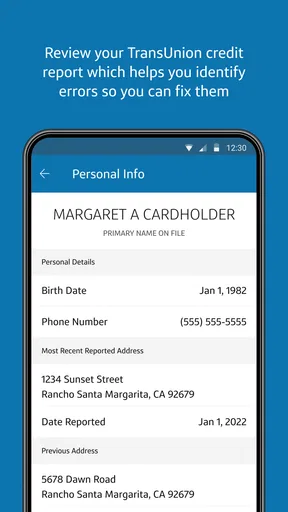
There is also a useful difference between a credit-monitoring app and official credit-report resources. I would use CreditWise for convenient awareness, then consult the relevant official source when I need to examine a report carefully or dispute an error. Treating the app as an early-warning layer rather than the final authority gives me a safer and more realistic process.
Who should use it, and who should look elsewhere
I think CreditWise is a good match for a first-time credit user, someone preparing for a major application, or anyone who wants a free way to make credit checks part of a monthly routine. It is also suitable for users who prefer a dedicated app instead of mixing credit information into a broader financial dashboard. The Everyone age rating makes it broadly approachable, although younger users should still understand that credit decisions and account security require adult-level care.
I would be more cautious about recommending it to someone who expects detailed financial planning. If the main goal is debt payoff scheduling, expense categorization, investment tracking, or bill automation, this is not the tool I would put at the center of that plan. I would also suggest another option to a user who does not want to create or maintain an account with a credit-monitoring service, or who is uncomfortable reviewing sensitive information through a mobile device.
Capital One customers may naturally consider it because of the developer, but I would not choose it solely on that connection. The right question is whether the app’s focused monitoring role suits the person’s needs and whether they are comfortable with the account and privacy choices presented during use. A non-Capital One alternative can be better if it offers the reporting access, controls, or broader financial view that the user values most.
My verdict after weighing convenience against control
CreditWise earns its place as a straightforward, free credit-awareness app. I like the idea of using it as a calm checkpoint before important decisions, not as a substitute for reading statements or contacting the proper organization when something is wrong. Its long availability, broad adoption, and strong average rating make it an easy option to consider, while the absence of a subscription cost makes experimentation less demanding.
My recommendation comes with a clear condition: use it deliberately. Check the privacy information, review permissions and notification previews, protect the sign-in, and decide in advance what you will do if an alert looks unfamiliar. Those habits matter more than simply installing the app. They turn monitoring into a useful process instead of another source of noise.
The best reason to install CreditWise is not to stare at a score; it is to notice changes early and make better-informed next steps. If that is the job you need, this finance app is a sensible choice. If you want complete money management, extensive credit-report research, or a service with a different control model, I would compare alternatives before making it part of my financial routine.
Pros
- Free access to your TransUnion credit score and report
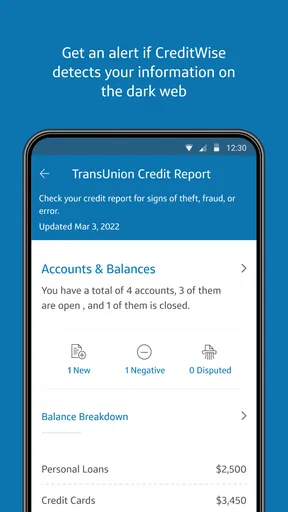
- Credit monitoring alerts can help spot suspicious changes quickly
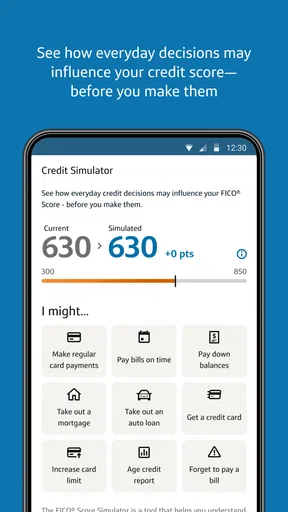
- Simulator tools show how financial actions may affect your score
- No Capital One bank account is required to use the service
- Personalized recommendations can support better credit habits
Cons
- Only TransUnion data is used
- so other bureau scores may differ
- Some features require sharing personal financial information
- Credit score updates may not appear immediately after account changes
- Offers and recommendations can feel promotional at times
- Availability and features may vary by location or user profile
FAQs for CreditWise from Capital One
What is CreditWise from Capital One, and what does it do?
CreditWise is a free credit-monitoring app from Capital One that helps users understand and track important information about their credit profile. It typically provides access to a VantageScore 3.0 credit score based on TransUnion data, score-change notifications, credit report information, and educational tools. You do not need to be a Capital One banking customer to use the service, although availability and features may vary by location and account status.
Can using CreditWise lower my credit score?
No. Checking your information through CreditWise uses a soft inquiry, which does not affect your credit score. This makes the app useful for regularly monitoring changes without the concern associated with applying for a credit card, loan, or other financial product. However, CreditWise itself does not prevent lenders from performing hard inquiries when you submit applications elsewhere, so those applications may still influence your credit history.
How accurate is the credit score and report shown in CreditWise?
CreditWise is generally helpful for monitoring trends, but the score displayed may not be identical to the score used by every lender. The app commonly shows a VantageScore 3.0 calculated from TransUnion credit-report data, while some lenders use FICO scores, different scoring models, or information from another credit bureau. Report updates can also take time, so users should treat the app as an educational monitoring tool rather than a guaranteed lending decision.
Is CreditWise free, and are there any hidden fees?
CreditWise is offered as a free service, and its core credit-monitoring features do not normally require a subscription or payment. You can use it to review your score, receive alerts, and learn more about credit without paying a monthly fee. Nevertheless, the app may display educational content or offers for financial products, so read the terms carefully before applying. Standard mobile-data charges from your carrier may still apply.
Is CreditWise safe to use, and what information is required?
CreditWise uses account security measures designed to protect personal and credit information, but users should still follow good security practices, such as creating a strong unique password and enabling available verification options. Registration generally requires identity and contact details so the service can match you with your credit information. Before downloading, review the app’s privacy policy, permissions, data-sharing practices, and official developer listing to ensure you are using the legitimate Capital One application.


